SuperVGA
The BOCA SuperVGA was a graphics adapter compatible from 1991 with the IBM Video Graphics Array (VGA) standard.
|
Released | September 1991 |
| Bus | ISA 16-bit | |
| Chipset | Tseng Labs ET4000 | |
| Standards | MDA, Hercules, CGA, EGA, VGA | |
| Memory | 256 KB, 512 KB or 1 MB | |
| Ports | 9-pin DSUB (digital TTL) | |
| Part # | ||
| FCC ID | EUD 5U9 BRI4330 | |
| Price | Sep 1991: $175 (256 KB), $195 (512 KB) or $245 (1 MB) | |
| See Also |


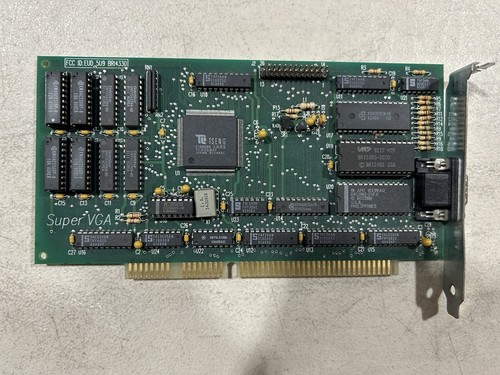
The SuperVGA came in three variants: a base 256 KB version, a 512 KB version and a 1 MB version. The latter could display 1024 x 768 in 256 colours, though in non-interlaced mode this would be limited to 60 Hz vertical refresh rate. At 800 x 600 it could run at 72 Hz.
Board Revisions
I have no information on the various board revisions on the SuperVGA card.
Competition
In 1991, the Boca Research SuperVGA competed directly with ATI VGA Wonder XL, ATI VGA Integra, Cardinal VGA732, Ahead VGA Wizard/Deluxe 5.0, VideoSeven VRAM II, Everex VRAM VGA, Focus2TheMax VGA 4000, Orchid ProDesigner IIs, STB Powergraph Ergo-VGA, Genoa SuperVGA 6400VC, Trident Impact III, and Diamond SpeedSTAR HiColor VGA. Of these, the ATI VGA Wonder XL was the highest performer. The Boca SuperVGA was very much middle of the pack.
In the Media
Based on the Tseng Laboratories chip set, the Boca SuperVGA also comes in two other memory configurations (or you can add your own chips to the base-priced model). The 512K version has a list price of $195, and the full 1MB configuration costs $245. You will need the full amount of memory to advantage of all the board's display modes.
The card can simultaneously display up to 256 colors in VGA, 800-by-600, and even noninterlaced 1,024-by-768 mode. The best it can do in the 1,024-by-768 modes is a 60-Hz vertical refresh rate, but it can provide up to 72 Hz in either the VGA or 800-by-600 modes.
Installation and setup was fairly easy, though there were some snags. The documentation is spartan: a small stapled booklet filled with few illustrations and lots of dense type in a small font. Unlike many other cards that use the generic SETUP procedure for modifying Microsoft Windows 3.0, the Boca SuperVGA requires special versions of some of these files; although not a major problem, it is a bit more of a nuisance than the procedures used by most other cards.
The card also does not have a VGA pass-through edge connector. There is a dual-pin connector for this purpose on the card, but it requires a special cable.
The Boca SuperVGA did turn in acceptable performance times. In many cases, the results were in the second half of the field, but the card was more competitive in the 800-by-600 results, especially the 256-color version of the tests. We also tested this board in high-resolution modes, where it proved slower than the VRAM-based Video Seven VRAM II.
The Boca SuperVGA's documentation and installation procedures may not be optimal, and its performance results are not the fastest, but these factors are good enough that they should not pose any problems. Add in the low list price and you get a card that is worth consideration by the budget-minded buyer."
PC Magazine, 24 Sep 1991
Setting it Up
I have no information of the hardware set up for the Boca card.
Downloads
Operation Manual Get in touch if you can provide this missing item! |
Original Utility Disk Get in touch if you can provide this missing item! |
|